004 · Rentalizer

Rentalizer
Deep Dive

Role
Lead Product Designer
Company
AirDNA
Year
2025
Tools
Strella AI · Amplitude · Statsig
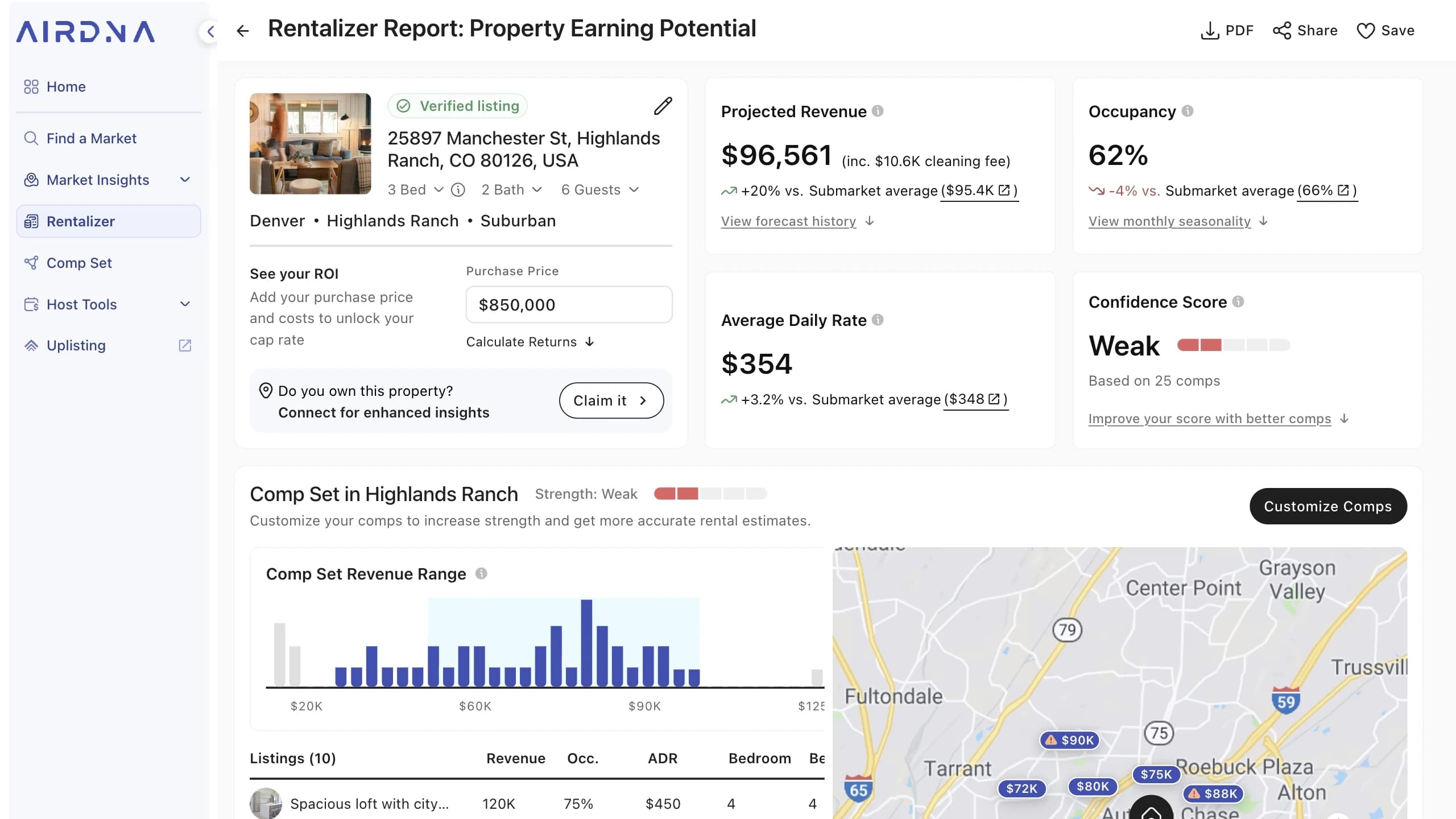
The AirDNA Rentalizer report for a Highlands Ranch property, showing a projected revenue estimate alongside occupancy and daily rate, a financial calculator, and a comparable-listings map

Rentalizer is AirDNA’s front door. It’s a free revenue estimator: type in an address, get back what that property could earn as a short-term rental. It’s the first surface most future customers touch, and for a large share of them it’s the only one they’ll see before deciding whether the product is worth paying for.

The page had a number problem. It gave people an estimate and then buried everything that would let them believe it.

01The Top of the Funnel

Rentalizer is AirDNA’s free revenue estimator. It is also the top of the funnel for the entire product.

EntryAround 70% of AirDNA users enter the app through Rentalizer.
WhoFirst-time visitors, low context, usually straight from searching their own address.
They knowTheir property. Nothing about the market.
They decideWhether the number is worth trusting, and whether the product behind it is worth paying for.
Must doStay free enough to earn trust, then convert on the page or route the user to where conversion happens.
02What the Page Was Asking

Every module sat at the same level. Nothing on the page said what to read first.
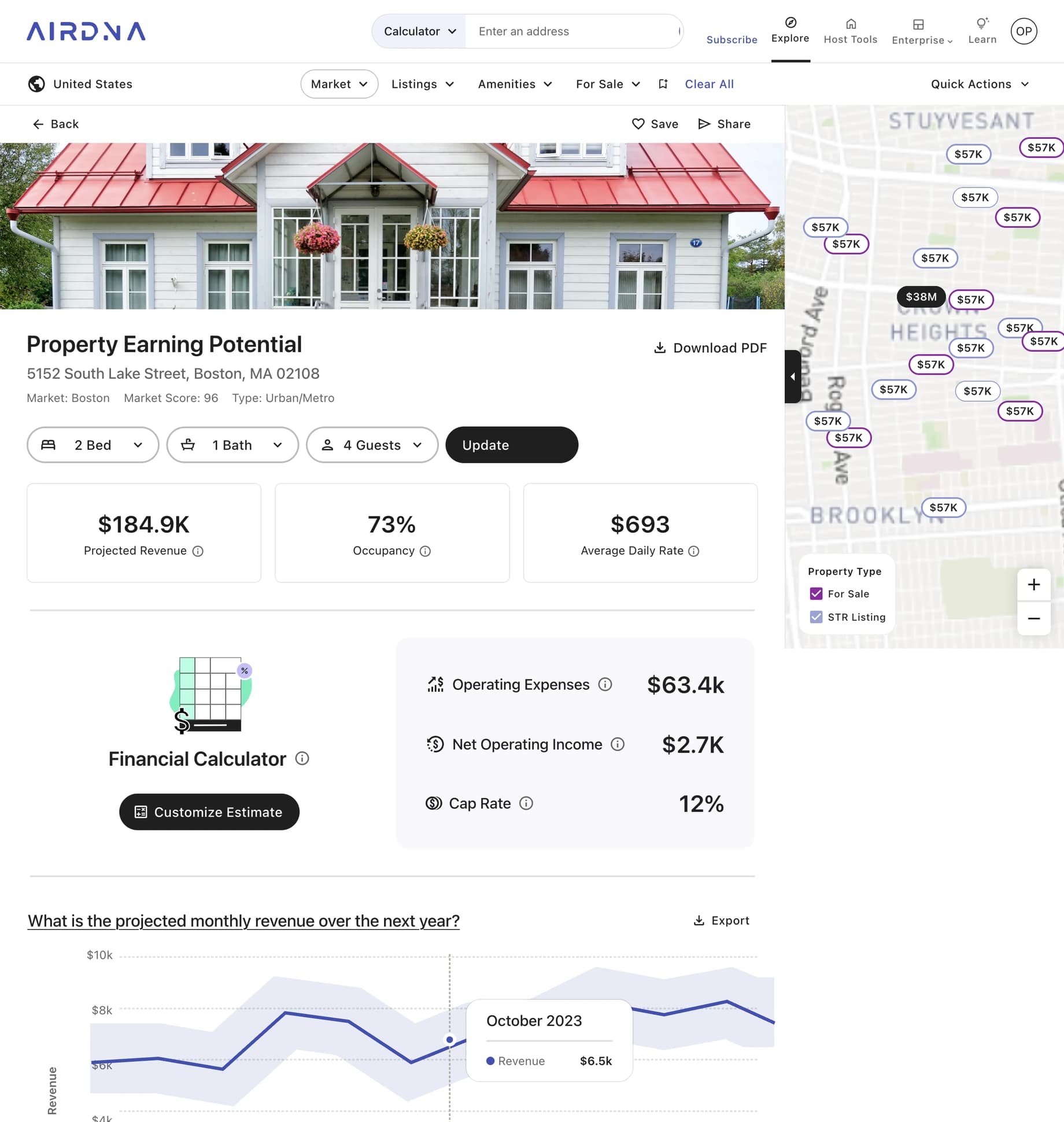
The Rentalizer page as it was: a projected revenue figure of $184.9K with occupancy and average daily rate beside it, a financial calculator below, and a map of comparable listings to the right.
01The Number
Stated as factThe estimate rendered as a flat figure with nothing attached to it. A range existed on a chart much further down, but nothing at the number itself told you how much to trust it.
02The Dead End7 of 9
An answer with nothing to do about itThe amenities module told you 90% of comparable listings have internet. It didn’t connect to the estimate, and it didn’t tell you what changing anything would do.
03The Inputs9 of 9
The comps were lastThe comp set is what produces the estimate. It sat at the very bottom, below partner placements, as a three-card carousel. The thing that explains the number was the least visible thing on the page.
04The Assumptions
Assumptions styled as resultsThe calculator stacks more math on a number the page hasn’t justified, and nothing marks which figures it filled in for you, which it derived from those, and which it can’t produce at all. They all look like findings.
03What We Learned
Quantitative
Land on Rentalizer~70% of app entries
Continue into the appVery few
Market OverviewMost of those who continue
Elsewhere in the appFewer still
ExitThe vast majority leave from this page.
Relative volumes, directional. Absolute figures withheld.

Marketing and SEO put most new users on this page. Almost all of them leave from it. The small share who continue mostly go to Market Overview, and fewer still reach anything else.

Source · Amplitude
Qualitative
AI-moderated interviews · Strellan = 22
ProfileExisting users. A mix of investors and hosts.
PlanAll on free plans.
TaskWalk through the current Rentalizer, then answer follow-up questions.
LimitationNo paid users in the sample, so this tells us about acquisition, not retention.
Finding 01

Participants read the estimate but couldn’t say where it came from or whether to trust it.

“I don’t know where to look to find out why it says that.”

Strella participant
Finding 02

Left alone, almost no one scrolled to the comp set. Even when they did, they couldn’t tell how it related to the numbers above.

Source · Strella · UserTesting

The drop-off and the interviews describe the same failure. The page gave people a number and no way to interrogate it, so they left.

04What We Were Solving For
Could not move
Stay freeHard limit
Rentalizer is an organic acquisition surface. Gating the estimate would trade conversion against traffic, so the free number was never on the table.
Most of our users were on laptops rather than the large monitors the request was shaped by, so there was less room above the fold than the ask assumed.
Had to achieve
Be understoodConvertRoute onwardFit above the fold
People had to be able to see where the estimate came from, and that the comp set is what drives it.
Customizing the comp set was new functionality and the intended paid lever. The page had to create demand for it.
People who wanted to keep exploring needed a natural next step into Market Overview instead of a dead end.
A senior data stakeholder wanted the comp set, the financial calculator, and as much of the charts as possible above the fold.
Today
Rentalizer
Exit
Market Overview
Customize comps — did not exist
Intended
Rentalizer
Customize compsNew · intended paid lever
Market Overview
Exit

The question wasn’t how much fit above the fold. It was what someone sees first, and where they go next.

05V1: Two Asks, One Layout
The business askedEverything above the fold
The research askedShow where the number came from

Breaking the page into blocks satisfied the density request and gave us somewhere to put a confidence score beside the estimate, so the number and its source finally sat in the same view.
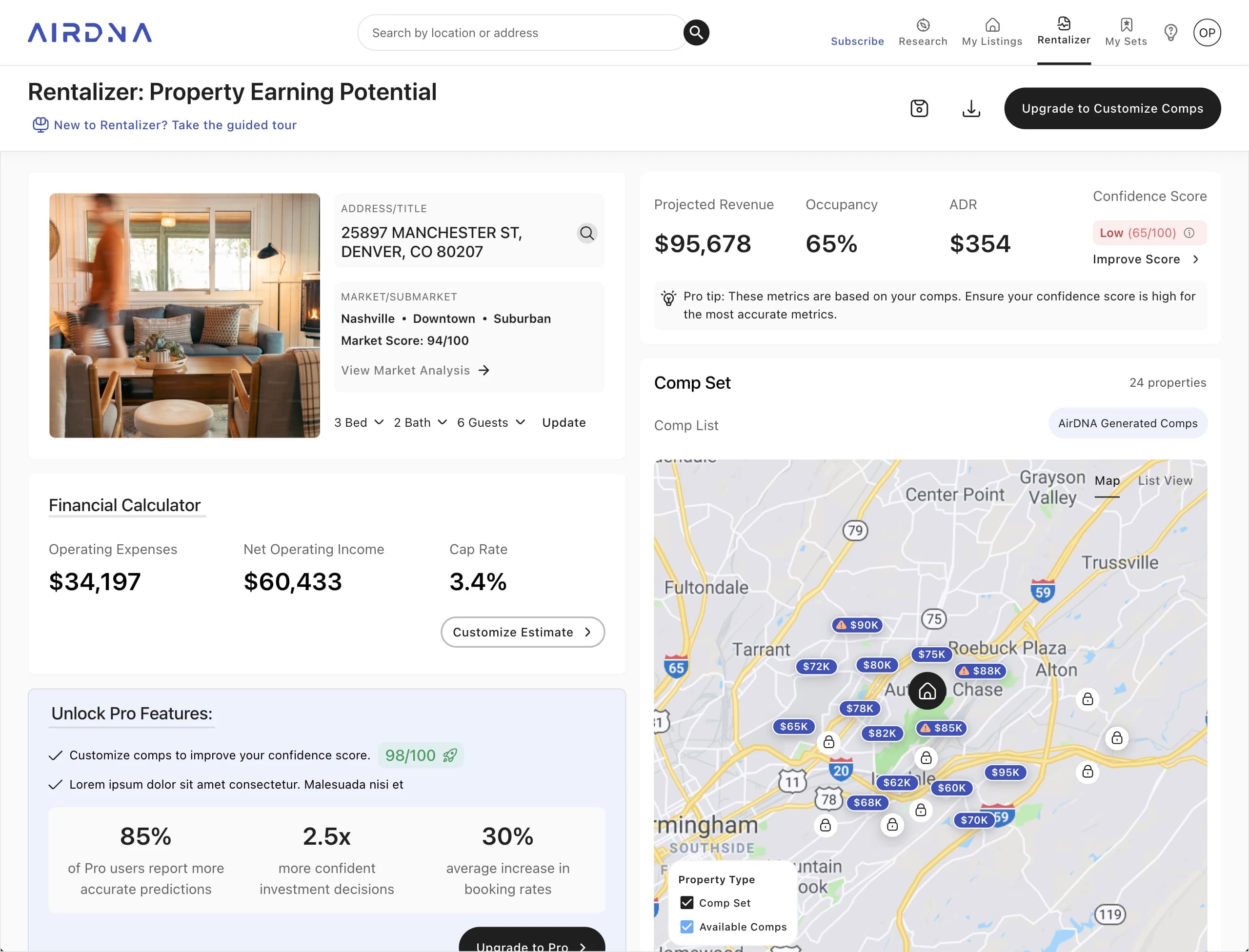
The V1 Rentalizer layout: a two-column page with the revenue estimate and its confidence score at the top left, the comparable properties beside it as a map and list, and the financial calculator below.
01Must be understood
Comps moved next to the numberThe comp set left the bottom of the page and moved into the same block as the projected revenue, so the estimate and the properties behind it read as one thing instead of two features. Map view for orienting geographically, list view for comparing bedrooms, rates and occupancy.
02Must be understood
A reason to care about the comp setThe confidence score gave the comp set a job. A weak set produced a low score, which told people the number above it was only as good as the properties feeding it.
03Must convert
Customize comps became the main actionCustomizing the comp set moved into the header as the page's primary action, with supporting upgrade prompts above the fold. It was the lever we wanted people to reach for.
04Must route onward
The market was a door, not a labelNashville, Downtown, Suburban and the market score all became links. Anyone who wanted more than one property's number had a way into Market Overview from the top of the page.

V1 answered four of the six constraints.

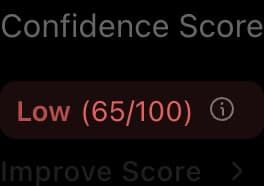
What it did not do was make any of those connections strong enough to change what people did. The comp set was adjacent to the number but still read as a separate feature. Confidence arrived as a verdict, Low, 65 out of 100, with no obvious way to act on it. The routes onward existed as links inside a label. Everything was present and nothing was insistent, which is why there was a V2.

06V2: Designing the Path

V1 put the right things on the page. V2 made the page argue for them.
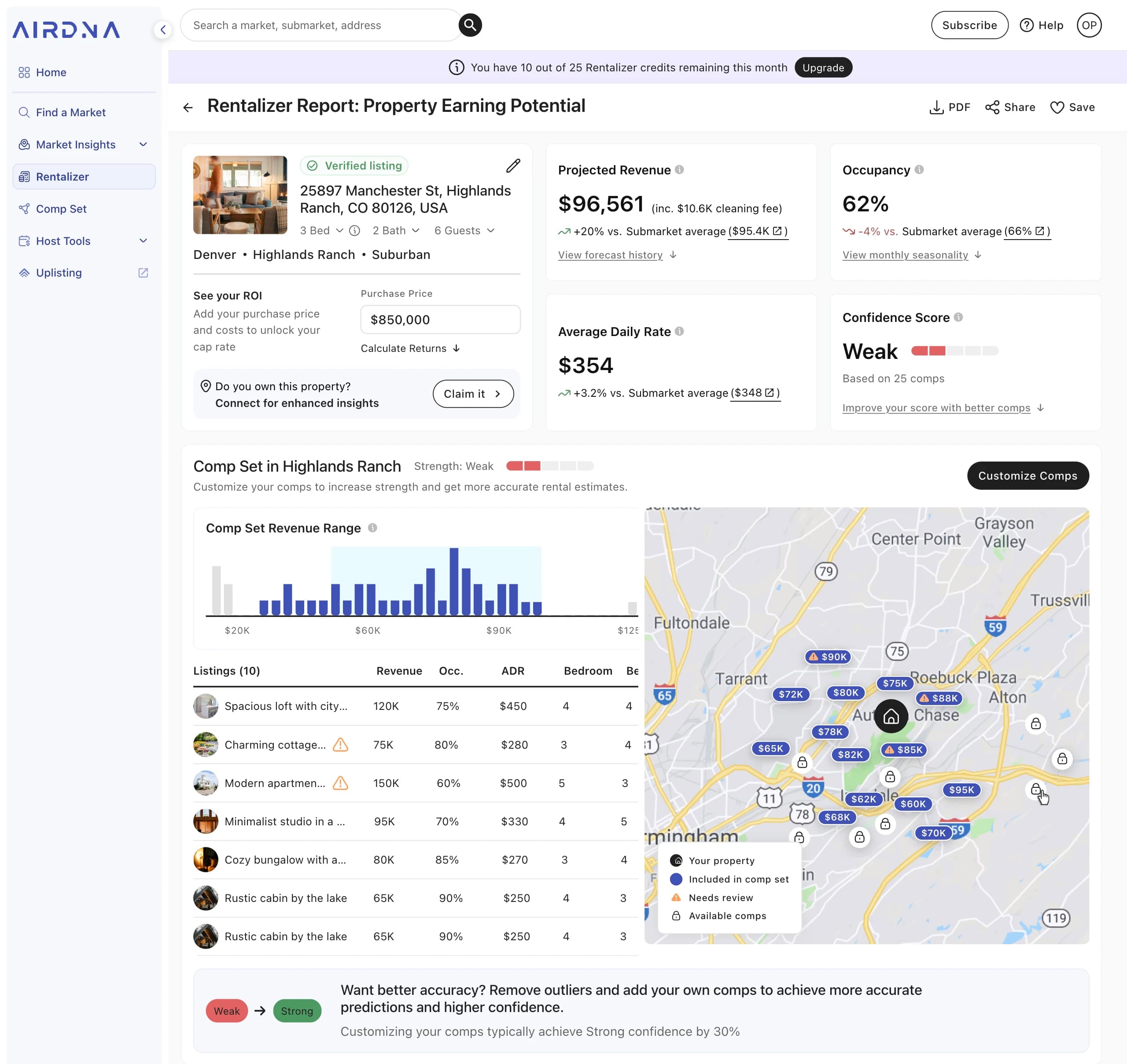
01The Free NumberThe estimate renders in full, and every metric is benchmarked against the submarket with a link into it
02The PairingThe same strength meter sits on the estimate and on the comp set, so one score has one cause
03The EvidenceThe revenue range shows the comp distribution, which is how the score gets derived in the first place
04The Paid LineThe CTA opens the feature rather than a paywall. The upgrade lands at the moment of editing
The V2 Rentalizer report: the revenue estimate benchmarked against the submarket, a strength meter on both the estimate and the comp set, a revenue-range distribution chart, and a Customize Comps action in the header.
The path to strong

A score is only worth showing if the page also shows you what moves it.

Weak01 / 04
Step 01 · FreeThe score is weakTwenty-five auto-matched comps, some of them wrong. The page says so on the estimate itself rather than burying it.
Step 02 · FreeYou open Customize CompsThe CTA is not a paywall. It opens the real feature, with your own comp set loaded and every control visible.
Step 03 · PaidEditing is where the ask landsDrop an outlier, add a property you know is comparable. The upgrade prompt arrives here, once you have already decided what you want to change.
Step 04The estimate is yoursThe meter reads strong on the comp set and on the estimate at once, and the number is now built from a set you chose.

The paywall sits one step deeper than it needed to, on purpose.

Gating the estimate was never an option, since Rentalizer exists to bring traffic in. But we also tested moving the ask off the entry point and into the flow, so that people could open Customize Comps, see their own set loaded, and get as far as deciding which comp to remove before being asked to pay. Someone who has already picked the outlier they want gone is a different person from someone looking at a locked button.

07What We Tested
The upgrade calloutWording, placement and visual treatment, run separately. The most-tested surface in the product.
The confidence scoreIts form and where it sat, shown above. A number out of 100 against a word on a five-segment scale.
The module orderHow the modules stacked below the fold, where the charts sat against the amenities, and how far down the partner callouts could go.
V1 · A score out of 100
Variant one: the confidence score shown as “Low (65/100)” above an “Improve Score” link.

A precise-looking number with no scale attached to it. Sixty-five out of what, and is that bad?

V2 · A word and a barWinner
Variant two: the confidence score shown as the word “Weak” beside a five-segment bar, with “Based on 25 comps” and a link to improve it with better comps.

Five segments give the number a ceiling, so weak reads as a position on a scale rather than a grade.

Tooling · Statsig
What shipped

V2 shipped as the live confidence display, and signups from the page moved in the right direction. The absolute numbers belong to AirDNA, so the honest version of this result is a direction rather than a figure.

What’s left

The editing itself happens on a separate page this project didn’t cover, and that’s where the most is left to do. Editing the comp set asks for market knowledge a first-time visitor doesn’t have: knowing that a five-bedroom listing at 150K is a bad match for your three-bedroom. V2 made the comp set legible and gave people a reason to care about it, but it stops there.

Give people what they need to decide, not to decide for them. Picking the set automatically would produce a better number and leave the original problem in place: you still couldn’t see why it changed.

Next ProjectAirDNA
004